

Waspmote: where our IoT revolution began
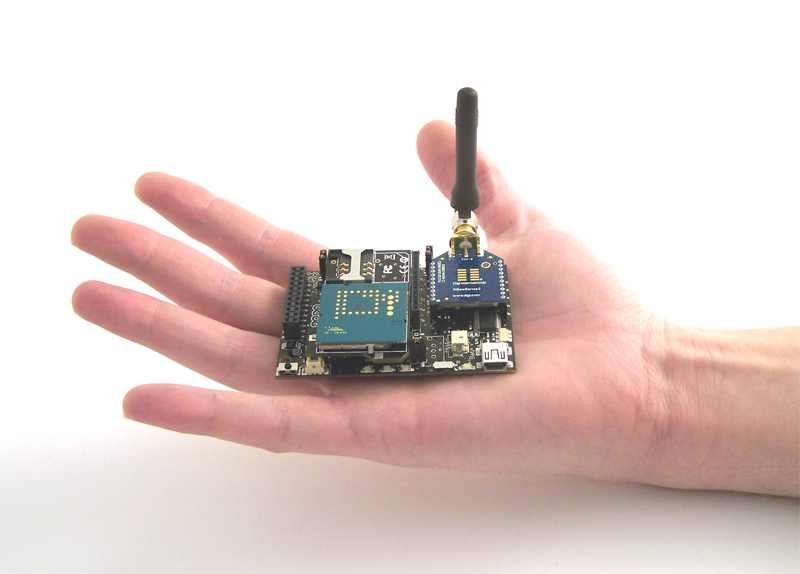
Waspmote wasn’t just a product. It was a spark. The spark that ignited a revolution in how we connect the physical and digital worlds. It gave birth to Libelium and became our flagship for years: an open, powerful, and versatile platform that inspired thousands of developers, researchers, and pioneers to explore the possibilities of the Internet of Things.
Features
Ultra low power (7 µA)
120+ sensors
Integrated on 7 Sensor Boards
12 radio technologies
Long range: LoRaWAN / LoRa / Sigfox / 868 MHz / 900 MHz. Medium range: ZigBee 3 / 802.15.4 / DigiMesh / WiFi PRO v3. Short range: RFID-NFC / Bluetooth 2.1 / BLE
Over the Air Programming (OTA)
Open source SDK and API
Encryption libraries
AES, RSA, MD5, SHA Hash
Certified encapsulated line
Plug & Sense!
Industrial Protocols
RS-485, Modbus, CAN Bus, 4-20 mA
No results match your search.
Elements and Models
Hardware
Architecture and board
Specifications
Technical parameters
Sensor Boards
Sensors and applications
Wireless Interfaces
12 radio technologies
Industrial Protocols
RS-485, CAN Bus, Modbus, 4-20 mA
Over the Air Programming
OTAP via FTP

Waspmote hardware architecture was specially designed to work with extremely low consumption. Digital switches allow to turn on and off any of the sensor interfaces as well as the radio modules. Three different sleep modes make Waspmote the lowest consumption IoT platform in the market (7 µA).


There are more than 120 sensors to connect to Waspmote: CO, CO2, soil moisture, wind, IR presence, humidity, temperature, pH, liquid, luminosity, etc. Our Sensor Boards allow developers to easily use sensors in Waspmote.
Water & Liquids sensors
Representative examples — confirmed at quotation stage.
- COD, BOD, TOC, SAC254 and temp StacSense, 2 mm path StacSense
- COD, BOD, TOC, SAC254 and temp StacSense, 50 mm path StacSense
- Conductivity, salinity and temperature C4E C4E
- Inductive conductivity, salinity and temperature CTZN CTZN
- Liquid level probe
- Manta+ 35A probe
- Manta+ 35B probe
- Optical dissolved oxygen and temperature OPTOD OPTOD
- pH, ORP and temperature PHEHT PHEHT
- Radar level VEGAPULS C21 VEGAPULS C21
- Suspended solids, turbidity, sludge blanket and temperature MES5 MES5
- Titanium optical dissolved oxygen and temperature OPTOD OPTOD
- Turbidity and temperature NTU NTU
Air & Gas sensors
Representative examples — confirmed at quotation stage.
- CH4 sensor
- CO sensor
- CO2 sensor
- H2 sensor
- H2S sensor
- NH3 sensor
- NO2 sensor
- O2 sensor
- O3 sensor
- Particle Matter (PM1 / PM2.5 / PM10)
- PH3 sensor
- SO2 sensor
- Temperature and Humidity
Precision Agriculture sensors
Representative examples — confirmed at quotation stage.
- Conductivity, water content and soil temperature TEROS 12 TEROS 12
- Fruit diameter
- Leaf wetness
- Leaf wetness (LWS) LWS
- Multilevel soil moisture
- Multilevel soil moisture and conductivity
- Non-contact surface temperature measurement SI-411 SI-411
- Soil moisture 1.5m, 4.5m or 8m (watermark) Watermark
- Soil oxygen level SO-411 SO-411
- Soil water potentials TEROS 21 TEROS 21
- Solar radiation (PAR) PAR
- Solar radiation (SP-510) SP-510
- Solar radiation and temperature Datasol MET2 Datasol MET2
- Tipping Bucket Accessory for GMX Weather Stations
- Trunk diameter
- Vapor pressure, humidity, temperature, and atmospheric pressure in soil and air VP-4 VP-4
- Volumetric water content and soil temperature TEROS 11 TEROS 11
- Weather station GMX-240 (W-PO) GMX-240
- Weather station GMX-550 (W-x-T-H-AP) GMX-550
- Weather station GMX-551 (W-x-T-H-AP-R) GMX-551
- WS-3000 (anemometer + wind vane + pluviometer) WS-3000
Smart Cities & Climate sensors
Representative examples — confirmed at quotation stage.
- Noise Level Sensor v2 Sensor v2
Applications by Sensor Board
- City pollution: CO, NO, NO2, O3, SO2, Particle Matter – Dust
- Air Quality Index calculation: SO2, NO2, Particle Matter – Dust, CO, O3, NH3
- Emissions from farms and hatcheries: CH4, H2S, NH3
- Greenhouse management: CO2, CH4, humidity
- Control of chemical and industrial processes: CH4, SO2, CO2
- Indoor air quality: CO2, CO, Particle Matter – Dust, O3
- Forest fires: CO, CO2
- Security: Vibration, hall effect (doors and windows), person detection PIR
- Emergencies: Presence detection and water level sensors, temperature
- Control of goods in logistics: Vibration and impact sensors
- Actuation: Control DC units such as irrigation valves, thermostats, illumination systems, motors, PLC’s, etc.
- Precision Agriculture: Leaf wetness, fruit diameter
- Irrigation Systems: Soil moisture, leaf wetness
- Greenhouses: Solar radiation, humidity, temperature
- Weather Stations: Anemometer, wind vane, pluviometer
- Potable water monitoring: pH, ORP, Dissolved Oxygen (DO), Nitrates
- Chemical leakage detection in rivers: Extreme pH values signal chemical spills, Dissolved Oxygen (DO)
- Swimming pool remote measurement: pH, Oxidation-Reduction Potential (ORP)
- Pollution levels in the sea: Temperature, Conductivity (Salinity), pH, Dissolved Oxygen (DO) and Nitrates
- Noise maps: Monitor in real time the acoustic levels in the streets of a city
- Air quality: Detect the level of gases and particulates in the air
- Waste management: Measure the garbage levels in bins to optimize the trash collection routes
- Sensors and Instruments
- Remote transducers
- Monitoring processes
- Data transmission in industrial scenarios
The user can choose among a wide variety of standard sensors.

There are 12 different wireless interfaces for Waspmote including long range (LoRaWAN / LoRa / Sigfox / 868 MHz / 900 MHz), medium range (ZigBee / 802.15.4 / DigiMesh / WiFi) and short range (RFID-NFC / Bluetooth 2.1 / Bluetooth Low Energy). They can be used solely or in combination of 2 by using the Expansion Radio Board.

Connect any sensor in industrial environments. Compatible with RS-485, Modbus, CAN Bus and 4-20 mA.
The set of Industrial Protocol modules for Waspmote allows the user to interface with different industrial buses:
1º- Connect any sensor to an existing industrial bus. Waspmote can be configured to work as a node in the network, inserting sensor data into the industrial bus already present. Waspmote can obtain information from more than 70 sensors currently integrated in the platform by using specific sensor boards (e.g: CO, CO2, temperature, humidity, acceleration, pH, IR, luminosity, vibration, etc). This way, the sensor information can be read from any industrial device connected to the bus.
2º- Add wireless connectivity to wired buses. Waspmote can be configured to read the information from the bus and send it to the Libelium IoT Gateway using any of the wireless radio modules available: 802.15.4, 868 MHz, 900 MHz, WiFi, 4G, Sigfox and LoRaWAN.
3º- Connect to the Cloud industrial devices. Waspmote can be configured to read the information coming from the bus and send it via wireless directly to the Cloud using WiFi, GPRS, GPRS+GPS, 3G or 4G radio interfaces.
No feature matches that search.
| Feature |
RS-485
|
CAN Bus
|
Modbus
|
4-20 mA (Current Loop)
|
|---|---|---|---|---|
| Standard | EIA RS-485 | ISO 11898 | Not available | Not available |
| Type | Not available | Not available | Software library, operated physically on the RS-485 module | Analog |
| Physical media | Twisted pair | Twisted pair | Not available | Twisted pair |
| Connector | DB9 | DB9 | DB9 (RS-485 module) | Not available |
| Network topology | Point-to-point, Multi-dropped, Multi-point | Multimaster | Not available | Not available |
| Devices | Maximum 32 drivers or receivers | Not available | Up to 32 in multi point systems | 1 |
| Mode of operation / signaling | Differential signaling | Differential | Not available | Not available |
| Speed | Maximum 460800 bps | 125 to 1000 Kbps | Not available | Not available |
| Voltage levels | -7 V to +12 V | 0-5V | Not available | Supply: 5-24V |
| Signals | Tx+/Rx+, Tx-/Rx- (Half Duplex); Tx+, Tx-, Rx+, Rx- (Full Duplex) | Half Duplex | Not available | Not available |
| Mark (1) / Space (0) | Mark: positive voltages (B-A > +200 mV). Space: negative voltages (B-A < -200 mV) | Not available | Not available | Not available |
| Data area | Not available | Not available | Up to 255 bytes per job | Not available |
| Interface / frame format | Not available | Not available | Layer 7 of the ISO-OSI reference model. Frame format: RTU | Not available |
| Distance | Not available | Not available | Not available | 900m |
| Applications | Industrial equipment, M2M communications, Industrial Control Systems (including the most common versions of Modbus and Profibus), programmable logic controllers, building automation, interconnect security control panels and devices | Automotive applications, home automation, industrial networking, factory automation, marine electronics, medical equipment, military uses | Multiple master-slave applications, sensors and instruments, industrial networking, building and infrastructure, transportation and energy application | Sensors and instruments, remote transducers, monitoring processes, data transmission in industrial scenarios |
OTAP with GPRS / WiFi via FTP
The concept of Wireless Programming, commonly know as Programming Over the Air (OTAP) has been used in the past years overall for the reprogramming of mobile devices such as cell phones.
However, with the new concepts of Wireless Sensor Networks, M2M and the Internet of Things, where the networks consist of hundreds or thousands of nodes, OTA is taken to a new direction, and for the first time it is applied using both mobile phone technologies such as GPRS and unlicensed protocols such as WiFi.
Benefits
- Enables the upgrade or change of firmware versions without physical access.
- Upgrades the new firmware by querying a FTP server which helps to keep battery life.
- Enables to upgrade an entire network in few minutes

Waspmote queries the FTP server for a new program version
Checks if program name, path and version are correct
Downloads the new program
Reboots and starts with the new program
Topologies
Protocols which support FTP transmissions are directly connected to the Network Access Point.
Radio modules supported: GPRS, WiFi
Storage System
Once the program is downloaded to Waspmote it is stored it in the 2 GB SD card.
Meshlium OTA-FTP plug-in
Meshlium the gateway of the IoT network, hosts the FTP server inside. The user interface of Meshlium, called Manager System, features a plug-in which permits to configure this FTP server automatically by attaching the program binary file to be used.


Worldwide regulatory compliance
Worldwide certified: CE, FCC, IC, Anatel, Telstra and AT&T.
Explore what Libelium has become
Today, we carry that same spirit forward—towards something even greater.
We’ve evolved into a company delivering end-to-end solutions, built for the real world—not just for labs. We now design and deploy environmental digital twins, powered by hyperlocal, reliable data captured by our own devices and processed on platforms engineered for real-time insights and decision-making.
Waspmote was our first step. At present, we walk further—with the same belief: that technology is a powerful tool to make the world a better place.
While Waspmote was ideal for prototyping and research environments, Libelium now offers integrated, production-ready IoT solutions for real-world challenges.
